
Updated on Nov 27, 2025
The BIOS has added Wake-on-LAN and scheduled wake-up functionality.
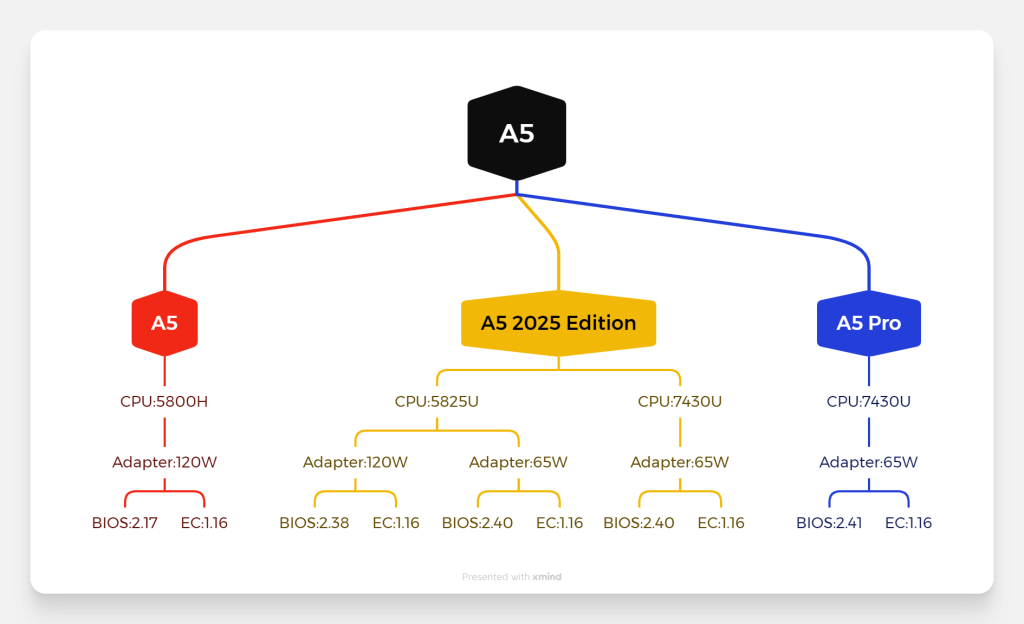
BIOS V0.40
65W adapter compatible models: A5 5825U and 7430U.
- A5 BIOS V0.40(USB Flash, para todos los sistemas)
- A5 BIOS V0.40 & EC 1.16(USB Flash, para todos los sistemas)
120W adapter compatible models: A5 5825U.
- A5 BIOS V0.38(USB Flash, para todos los sistemas)
- A5 BIOS V0.38 & EC 1.16(USB Flash, para todos los sistemas)
EC V1.16(Compatible with all A5 models.)
- A5 EC V1.16(USB Flash, para todos los sistemas)
Guide to Updating BIOS and Embedded Controller (EC)
Video Presentation
1.Default BIOS Features Display
Press the Del key repeatedly during startup or restart to enter.
2.Full BIOS
To enable full display mode in the BIOS for the A5, the BIOS unlock tool must be pre-executed in Windows. Other unlocking methods are currently not supported.
BIOS Unlock Tool Download link——bios-unlock-tool
Gracias por vernos. Si hay algún error, sus correcciones son bienvenidas.

 Español
  English
  Deutsch
  English (UK)
  English (Australia)
  Français
  English (Canada)
  Italiano
  Русский
  日本語
日本語