
Updated on February 18, 2025
A.Install Driver
For customers who have reinstalled the system, but the system is not provided by GEEKOM.
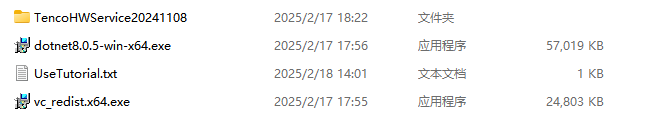
To install the necessary environment programs and set up TenconHWService20241108, please follow these steps:
- Install Environment Programs:
- Run
VC_redist.x64.exeto install the Visual C++ Redistributable. - Run
dotnet8.05winx64.exeto install the .NET Framework.
- Run
- Extract the Compressed Package:
- Unzip the
TenconHWService20241108package to a convenient location.
- Unzip the
- Run the Installation Script:
- Navigate to the extracted folder.
- Rightclick on
install.batand select “Run as administrator“.
- Follow OnScreen Instructions:
- In the window that appears, enter
1and press Enter to proceed.
- In the window that appears, enter
- Reboot the computer
B.Update Driver
For customers who have not reinstalled the system or are using the official GEEKOM system.

The current version optimizes the display effect of the parameter display screen and will no longer show additional data.
- Uninstall the old version of the display driver
- Open the TecnoHWService folder on the C drive, file path: C:\Program Files\TecnoHWService
- Run the install.bat file as administrator
- In the pop-up window, type 2 and press Enter
- Uninstallation is successful
- Install the new version of the display driver
- Extract the downloaded archive TenconHWService20241108
- Open the TenconHWService20241108 folder and run the install.bat file as administrator
- In the pop-up window, type 1 and press Enter
- Installation is successful, please restart your computer
Gracias por vernos. Si hay algún error, sus correcciones son bienvenidas.

 Español
  English
  Deutsch
  English (UK)
  English (Australia)
  Français
  English (Canada)
  Italiano
  Русский
  日本語
日本語