
Updated on Mar,19, 2026
According to an official announcement from Microsoft, the legacy certificate used for Microsoft Secure Boot, which has been in place since 2011, will expire between June and October 2026. The expiration of this certificate may have certain implications for personal devices.
| Situation | Impact Level | Description |
|---|---|---|
| Can the computer still boot normally? | Almost no impact | The computer can still start up, run programs, and access the internet normally after expiration |
| Daily use (office work, gaming, watching videos) | Basically no impact | Does not affect the browser, software, or files |
| Normal Windows updates | Most are possible | Regular security updates and feature updates can still be installed |
| Security protection during startup | Gradually decreases | Unable to receive new Boot Manager, Secure Boot database, or revocation list updates |
| Newly discovered bootkit/startup-level vulnerability fixes | Cannot be obtained | Security decreases over the long term (like an house’s防盗门 lock not being replaced, but the door can still be used) |
| BitLocker encrypted drives | May be affected | Some enhanced functions or new mitigation measures cannot be applied |
| Very rare special cases | Third-party startup items may fail | Such as certain older graphics card VBIOS, special dual-boot bootloaders |
In the short term, there will be virtually no noticeable impact, but long-term security will be compromised—especially when new vulnerabilities emerge after the second half of 2026.
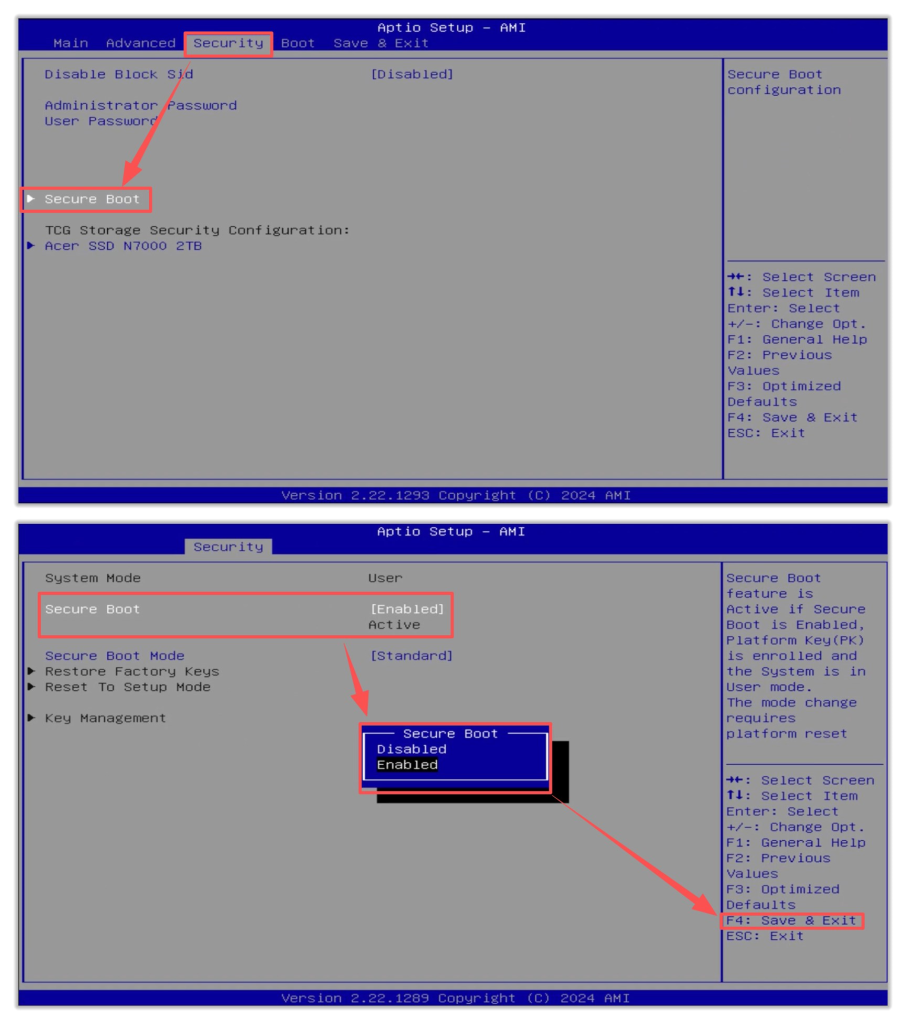
As shown in the figure, the method to enable the Secure Boot option in BIOS. On most devices, it is enabled by default and requires no manual configuration.
What Do You Need to Do as a Personal User?
1.Keep Windows Update enabled and install updates promptly
Settings → Windows Update → Advanced Options → Receive updates for other Microsoft products (turn on)
For most computers manufactured after 2020, the new 2023 certificate will be automatically pushed via regular cumulative updates in 2025–2026.
2.Check if the update has been applied
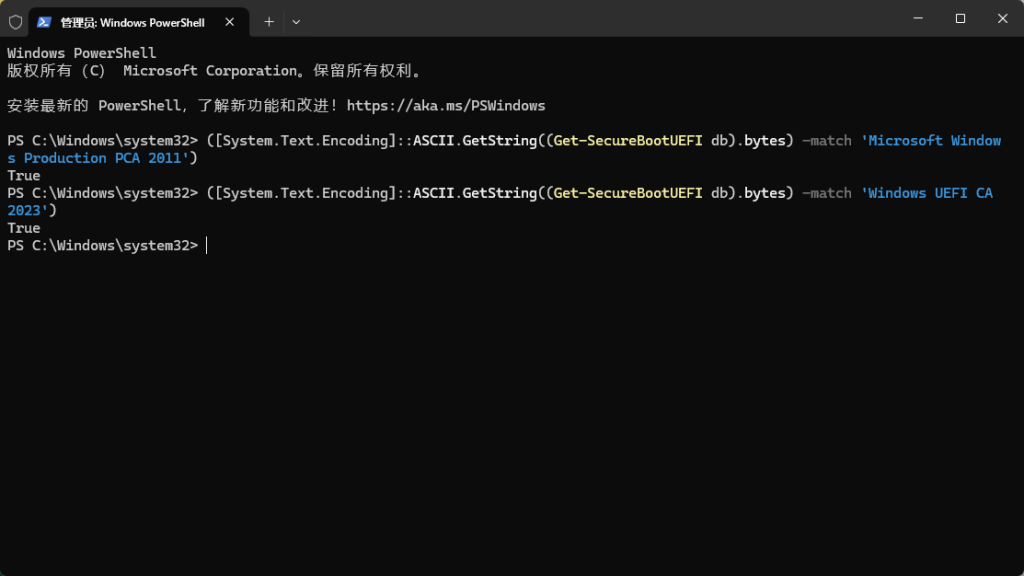
Open PowerShell as an administrator, then paste and run the following commands:
Check for the 2011 certificate:
([System.Text.Encoding]::ASCII.GetString((Get-SecureBootUEFI db).bytes) -match ‘Microsoft Windows Production PCA 2011’)
Check for the 2023 certificate:
([System.Text.Encoding]::ASCII.GetString((Get-SecureBootUEFI db).bytes) -match ‘Windows UEFI CA 2023’)
3.Check if the BIOS is Up to Date
According to information disclosed by the GEEKOM R&D department, as of March 19, 2026, the BIOS versions for the following models (and newer) already support the UEFI 2023 certificate. Updates for other models will also be completed before the UEFI 2011 security certificate expires.
| Intel Series | BIOS Version | AMD Series | BIOS Version |
| Air12 Lite | 0.17 | A5 U Series(5825u 7430u)(65W Adapter) | 2.43 |
| Mini Air12(N95) | 0.44 | A5 7640hs | 0.01 |
| IT12 | 2.34 | A5 Pro | 2.43 |
| IT13 | 1.23 | A5 Pro(7640HS) | 0.02 |
| GT12 Pro | 2.34 | AE7 | 0.54 |
| GT13 Pro | 1.21 | AE8 | 0.57 |
| XT12 Pro | 2.33 | A7 7940HS A7 7535HS | 0.58 2.42 |
| XT13 Pro | 1.22 | A8 | 0.61 |
| IT1 Mega | 0.68 | A6 | 2.39 |
| IT13 Max | 0.68 | AX7 Pro | 0.54 |
| IT15 Max | 0.68 | AX8 Pro | 0.56 |
| GT1 Mega | 0.68 | AE8 Max | 1.22 |
| GT13 Max | 0.68 | A7 Max | 1.26 |
| GT15 Max | 0.68/0.14 | A8 Max | 1.22 |
| XT1 Mega | 0.68 | AX8 Max | 1.22 |
| A9 Max | 0.25 | ||
| A9 Mega | 0.09 |
Merci d'avoir regardé. S'il y a des erreurs, vos corrections sont les bienvenues.

 Français
  English
  Deutsch
  English (UK)
  English (Australia)
  English (Canada)
  Italiano
  Español
  Русский
  日本語
日本語